
How to Translate YouTube Videos: Best Methods and Tools
According to Global Media Insight (2025), YouTube has over 2.7 billion monthly active users, and more than 70% of total watch time comes from outside the United States. When your videos are subtly in or audio in a single language, chances are that you are missing a huge portion of your prospective audience in the world. This will mean less revenue, engagement, and reach for content creators.
Therefore, it the question becomes: how to translate YouTube videos effectively, correctly, and cheaply?
The paper is going to explore three major methods, which include the YouTube translation tool, creative methods with ChatGPT, and specific translators using AI. We will also suggest 5 good video-to-text tools that can assist you in the initial steps of the translation.
Traditional YouTube Built-in Translation Methods
The simplest and least complicated feature to use is the built-in subtitle translation option that is available on YouTube. The only thing one needs is to log in to YouTube Studio without any extra software or subscription.
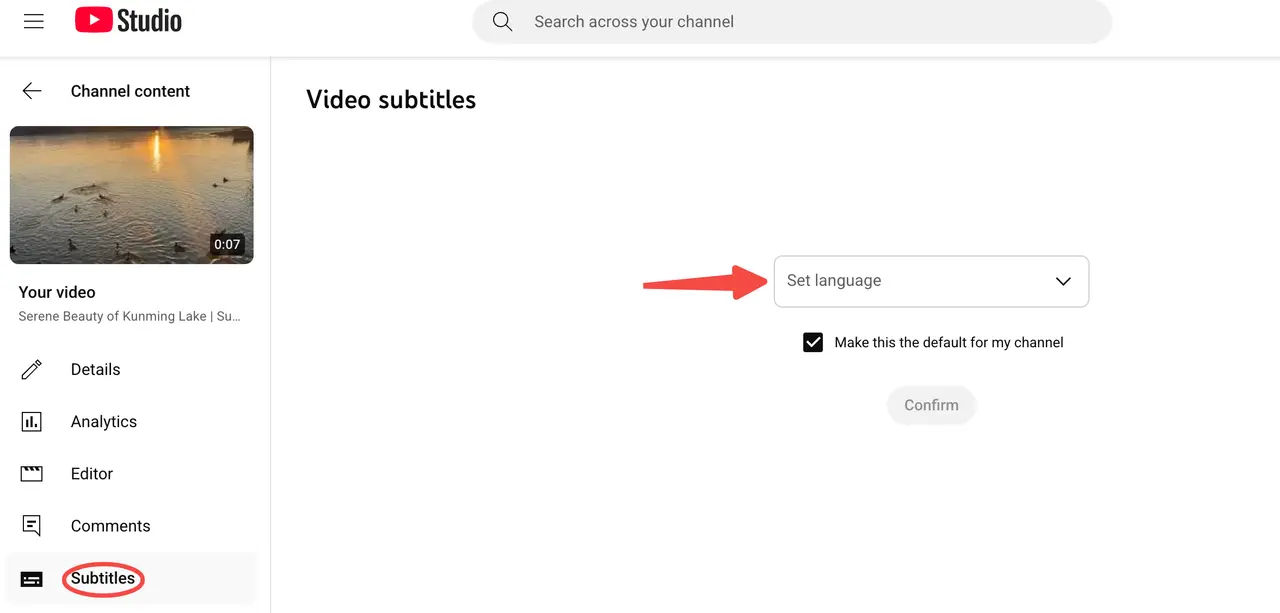
The process is as follows:
- When you upload your video, you will see the "Subtitles/CC" page.
- You can upload the original language subtitles (SRT file) of your video, or you can use the subtitles generated automatically by YouTube.
- Click on Add Language, and choose the target language. Google Translate will then be used to automatically translate subtitles on YouTube.
- Fine-tuning and publishing are allowed manually.
The greatest benefit of this approach is that it is free and is easily integrated. It is all done on the YouTube platform, which saves the burden of importing and exporting files using external software. In those cases where creators already have subtitles, it can be accomplished within minutes.
Yet, there are some obvious problems, as well. YouTube automatic translation uses Google Translate, which is not always natural in its interpretation of the meaning of complex contexts, technical terms, and jokes. It may even give grammatical mistakes or counterintuitive meanings. Moreover, it does not do any spoken translation or lip-synced dubbing and only processes subtitles.
Curious about YouTube video transcripts?
🔍Find out here: How to Effortlessly Get a YouTube Video Transcript in Just 3 Simple Steps
Using ChatGPT for YouTube Video Translation
ChatGPT also has a sense of context, tone, and target audience, unlike machine translation. It is not merely a translation tool; it is a kind of language consultant who knows the way your video is going to be.
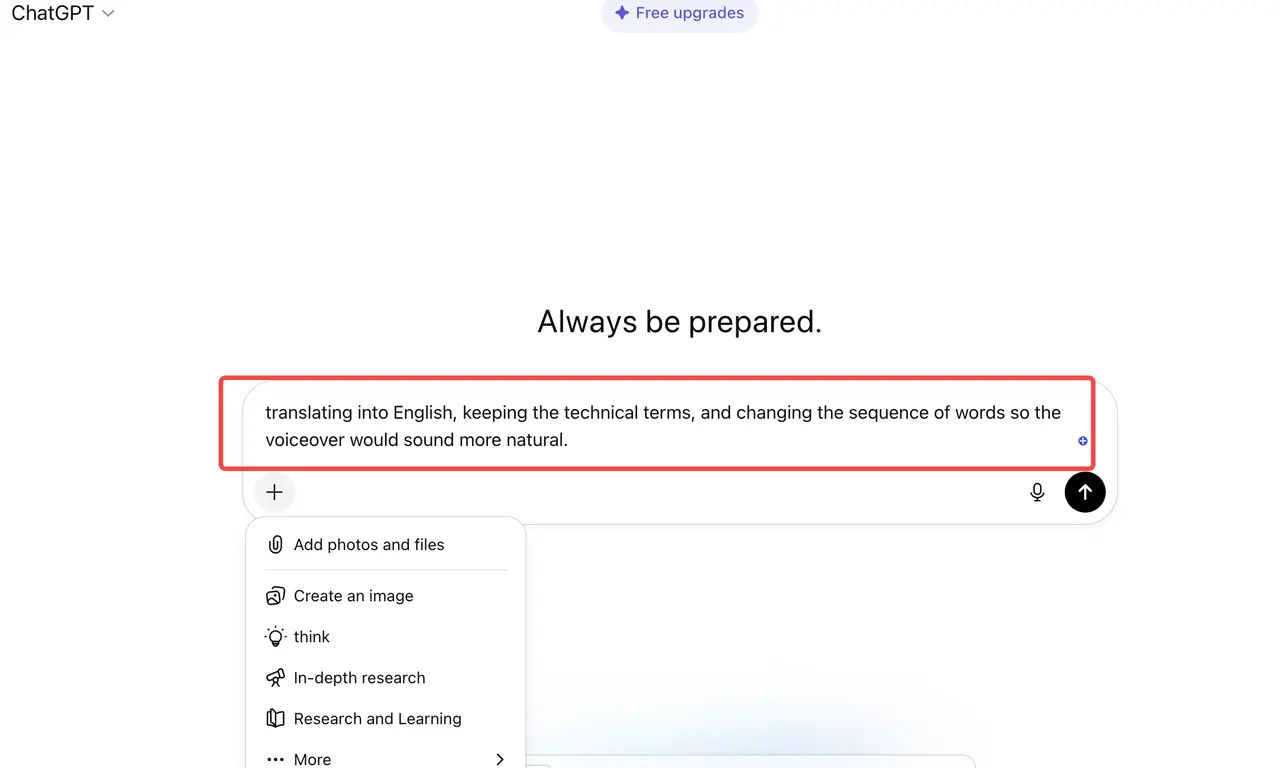
The whole process is normally divided into four stages:
- Extract text: Take a video-to-text tool (some recommendations will be presented later) to produce a correct transcript.
- Prompt: Feed the text into ChatGPT and apply unambiguous prompts to clarify your requirements. For example:
---"Translating the following into Spanish and employing a natural voice that would appeal to young Mexican listeners."
---"Translating into English, keeping the technical terms and changing the sequence of words so the voiceover would sound more natural."
---"Translate it and refine it to a natural sound that can be used in a video dubbing."
- Proofread and revise: semantic correctness and natural language.
- Create subtitles: Save the translated text in the form of an SRT or VTT file and post it on YouTube.
This approach has the benefit of being highly flexible. You are able to establish the tone, audience, or even the content style. ChatGPT is conversational and can interpret the context and deal with such specifics as puns, slang, and cultural nuances. It is also comparatively cheap. The cost of using GPT-4 or GPT-3.5 is often much less than the cost of dedicated AI solutions.
Nevertheless, it is not a one-stop device. Extraction of text will have to be performed manually; the subtitle files have to be generated and uploaded as well. Moreover, although the quality of the translation is also great, it still has to be checked by humans.
Using AI Tools for YouTube Video Translation
There are many AI software solutions that can be found in the market that target video translation. They usually provide one-stop shopping. Once a video has been uploaded, the AI will automatically identify the audio, create text, and translate it into the target language, even creating a full translation with dubbing and lip-synching.

The overall course of action is as follows:
- Upload a video link or file.
- The audio is automatically transcribed into text, and a source language is created.
- The AI then transfers the text into the target language.
- Additional options have to do with creating a voice dubbing that resembles the original and lip-synching of the audio.
Most of the tools apply models that are optimized to work with video and audio, which makes them more accurate than traditional machine translation. The AI level of automation also does not require subtitles and audio to be processed manually. Certain advanced tools are capable of simulating the voice of the speaker and producing videos in the format of multilingual simultaneous audio.
Most of the video translation platforms, however, provide a subscription-based or per-minute charge, which may be an expensive option for lengthening videos. Moreover, there are great variations in the quality of voice cloning across tools. There are some sounds that sound natural and smooth, and those sounds are distinctly robotic.
Which Method Should You Choose?
When choosing a translation method, the most critical considerations are your goals, budget, and quality requirements. A comparison table comparing the three methods mentioned above is below:
| Method | Cost | Accuracy | Flexibility | Voice Translation | Best For |
| YouTube Built-in Tools | Free | Moderate | Low | No | Beginners, budget-conscious users |
| ChatGPT Translation | Medium | High | Very High | No | Content creators, educators |
| Professional AI Tools | High | Very High | Moderate | Yes | Businesses, teams, brand channels |
- To expand your understanding of your content, choose YouTube's built-in features.
- To enhance naturalness and create emotional resonance with your audience, choose ChatGPT.
- For one-stop professional translation, dubbing, and lip syncing, choose AI tools.
A hybrid approach may be a contender if you want to have efficiency and quality. Write a rough draft with the help of an AI tool and refine the text and tone with the help of ChatGPT. It is time-saving and makes the content sound natural and authentic.
Top 5 YouTube Video to Text Converters
Before you begin translating, obtaining an accurate transcript is crucial. Here are five top-performing video-to-text tools:
ScreenApp
ScreenApp is a light web-based video transcription service that can be used to recognize multiple languages and generate automatic subtitles. All one needs to do, is upload your video, and the system identifies the audio and creates editable text in a short time.
Its user-friendly interface and high speed make it the best choice for creators who have to process lots of video materials. Better still, it has the direct ability to export SRT files easily so that they can be translated and uploaded.
Otter.ai
Otter happens to be one of the most developed speech transcription tools in the market, which supports real-time transcription as well as meeting recordings. In the case of the YouTube creators, it recognizes the contents of speech as well as labels speakers, making it perfect to use in interviews or multi-party discussions. The free version can be used on a daily basis.
Whisper by OpenAI
Whisper is an open-source speech recognition model designed by OpenAI and has extremely high accuracy. It has dozens of languages and is able to automatically identify the type of language. Although it involves a certain technical installation, the result is very reliable, hence appealing to users who require high accuracy.
Descript
Descript is a universal transcription, editing and editing platform. It is not only a transcribing tool but also enables one to edit videos by directly editing text. This is an effective tool for podcasters or those who create video tutorials, as it can hugely enhance productivity.
Happy Scribe
Happy Scribe is also a multilingual transcription and translation software, and has a user-friendly interface that is easy to use. It also has team collaboration features, which make it suitable for multi-person content teams. It provides dynamic output formats and also supports several subtitle files needed by YouTube.
Conclusion
The quality of every translation starts with a good transcript. The further translation can only be natural and not inconsistent in the first place because of the clear transcription of the content.
If you would like to simplify this process, you can give ScreenApp a try. It is able to assist you in the fast creation of sufficient transcripts, which form a strong basis for your multilingual work.