
Local Video Transcription: Secure, Fast, and Reliable Offline Solutions
The use of video content is now pervasive in most locations. It is typical in education, recording meetings and with the creation of online content. Due to this fact, video transcoding has become an important aspect of information management and exchange.
This is normally done by the use of the cloud in traditional practices. As simple as this may be, it may cause trouble. These are the possibility of information leaks and delayed uploading. In order to overcome these problems, local video transcribing is gaining popularity.This is a safer and quicker way. This article explicitly describes the nature of local transcription, its application and the methodology.
What Is Local Video Transcription?
Local video transcription means converting speech to text directly on your own device. You don't need to send the video to an online server. Everything happens on your computer. Since it starts with loading the video and removing the audio to the production of the text, the whole information remains in your machine.
Such transcription is typically performed with the help of AI models or speech recognition programs that are deployed to your personal computer. People will not need to transfer their personal content to another company. Data security and privacy is highly enhanced by this approach. It also allows the user to have full control of the entire process.
The local video transcription is used commonly in a number of situations in the real life. These involve interviews, meetings of the companies and teaching sessions. It is also applied in the case of confidential information. Spoken content can be easier converted into text by individual creators and organizations. Simultaneously, they will be able to ensure that their information remains secure.
Why Choose Local Transcription Over Cloud Solutions?
Cloud-based transcription services are now ubiquitous. Video sites and office platforms all have built-in features. Users with internet access can easily upload videos and receive transcriptions. However, when working with high-security or large-scale projects, cloud-based solutions often have limitations. For users who care most about safety, privacy, or getting work done, local transcription is clearly the better choice.
The table below shows the main differences between the two options in a simple way:
| the Comparison Aspect | Local Video Transcription | Cloud Transcription |
| Data Security & Privacy | Fully offline, data stays on your device | Requires upload to the cloud, potential data risks |
| Network Dependency | Works without an internet connection | Needs a stable internet connection |
| Speed & Performance | Faster since no upload is required | Upload and processing speed depend on network quality |
| Cost Structure | One-time setup, long-term use with no extra fees | Subscription-based or pay-per-use model |
| Control & Customization | Full control over models and settings | Limited to platform’s configurations |
To put it briefly, when you are interested in the safety of your content and, at the same time, you need a fast, stable, and inexpensive means of transcribing the information, a local solution will fit you better. It permits you to work without the use of the internet, and provides you with complete control over your information and the way things are done.
How Local Video Transcription Works?
The law of local video transcription is straightforward. It will automatically transcribe a video audio into text with the use of a speech recognition model that will be executed on the device of the user. Superior connection to the Internet is not necessary. The whole procedure is automated and smooth and it does not need any technical expertise. The user just has to upload a video file and within minutes he or she gets quality transcripts.
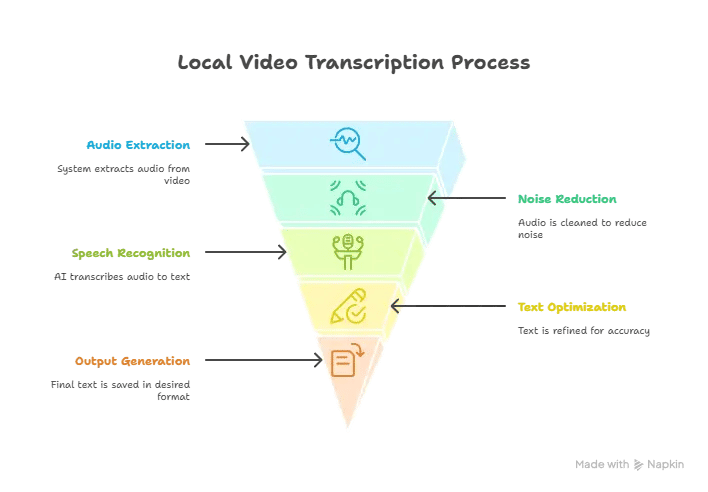
The following stages are generally involved in the process:
- Input and Preprocessing: Once a user selects a video file, the system will automatically load the video file and extract the audio. Thereafter it removes noise and converts its form and makes the sound more clear. This provides less noisy audio in the next step.
- Speech Recognition: This is sent to a speech recognition AI that operates on your device. This is the step which is the most important. The AI gradually transcribes the audio into written text.
- Post-Processing and Optimization: The optimization of the text is then done. Errors are corrected, and punctuation is inserted, as well as the text is divided into sections. The system refers to an inbuilt word list and language rules. It is also able to distinguish between various speakers. This renders the result more natural.
- Output and Export: The result is possible to save the final text in various formats of file (such as .txt, .srt or .vtt). It allows users to create subtitles, arrange contents or edit more.
The entire process allows you to transcribe videos on your personal computer. It saves your information confidential, is user-friendly and yet remains functional.
How to Choose the Right Local Transcription Setup?
The selection of an appropriate local transcription solution would be based on your requirements and the availability of the devices. Various functions, video types, and accuracy levels need different hardware and software. As a rule, it is necessary to take into account the following aspects:
- Hardware requirements: The faster your computer can run its processor and graphics card, the faster the transcription process. When you tend to use long videos or contents in other languages, then it is better to have a computer with a dedicated graphics card. This helps the AI work faster.
- Type of models: Smaller models are fast and do not require a powerful computer but may commit more errors in the presence of background noise. Larger models are more precise but require more powerful hardware.
- Language support: Some tools primarily support English, while others can handle multiple languages or local dialects. Select based on your video language needs.
- User experience and interface: For non-technical users, a simple and intuitive interface is often more important than the sophistication of the tool itself.
- Price and licensing: Some tools are free and open-source, suitable for users who can configure them. Paid tools usually offer better support and updates.
ScreenApp should be a good video translator to start if you need a solution balanced in performance, usability, and cost. It integrates modern AI models without complicated installation or setup. Users can transcribe in a few steps, and it also works offline, ensuring both security and speed.
ScreenApp: Best Free AI Video Translator
ScreenApp is an intelligent application among those making videos, teaching, and collaborating. The fact is that it makes you work with a lot of videos simultaneously. It converts video material into text and translates it with the help of AI. The tool is capable of working entirely on your individual computer. There is no need to upload videos to the cloud. This saves time at work and your personal videos are secure.
ScreenApp's key features include:
🔹 Local Video Transcription: You can directly import video files. It creates subtitles and text for you offline. This keeps your data safe.
🔹 AI Multi-Language Translation: It can identify and translate multiple languages, automatically creating bilingual subtitles. Useful for international projects or teaching videos.
🔹 Quick Processing: It is faster using local computer resources, significantly reducing transcription time compared to online tools.
🔹 Multi-Format Export: Supports .SRT, .VTT, and .TXT files, making editing and sharing easy.
🔹 User-Friendly Interface: Simple and intuitive, suitable for users without technical expertise.
Conclusion
Text can be created in a safer and more efficient manner by local video transcription. It is used by individuals, business groups and even in schools. In contrast to the traditional cloud solutions, local transcription is fully offline. This implies that your information remains safe and you can be in full control of it.
In case you wish to complete your work or other creative projects in a shorter amount of time, and you also want to ensure your confidential data is not lost and stay safe, then ScreenApp will become your choice. There is no boring installation to do, and no worry about information leaks. Try ScreenApp today and unlock the value of your videos.